
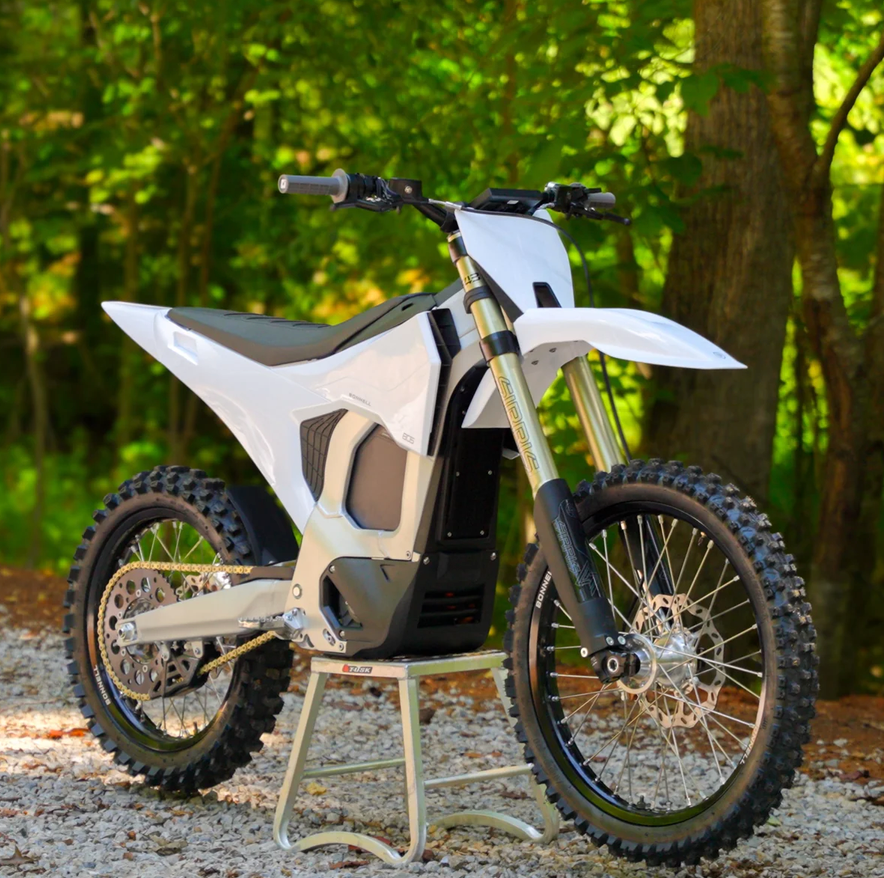
Unboxing & Assembling Your Bonnell 805 RX: The Ultimate Setup Guide
Congratulations on taking delivery of your new Bonnell 805 RX from Charged Cycle Works! Unboxing a high-performance e-Moto is an exciting experience, and setting it up correctly ensures you get peak performance and reliability from day one.
To help you get from the crate to the trail smoothly, we’ve broken down the official Pre-Delivery Inspection (PDI) checklist—enriched with pro tips directly from the factory unboxing process, as well as, tips we've learned from assembling dozens of 805's for our local customers.
Follow along this video as we break down each step and pay close attention to our notes.
What’s in the Box?
Before you start unboxing, check out the included Bonnell Essentials & Tool Kit. Bonnell ships each bike with a custom CNC-cut foam tool case containing virtually everything needed for build and maintenance:
-
Included Tools: Torque wrench, spoke wrench, headset bearing spanner, combination spanners, sockets, Torx keys/sockets, T-handle socket wrench, pliers, and screwdrivers.
-
Essentials Box: Charger, user documentation, and essential spare hardware.
Phase 1: Unboxing & Initial Inspection (Video Timestamp 0:45)
-
Verify Paperwork: Cross-check the VIN on the bike’s frame against your delivery invoice.
-
Inspect Packaging & Frame: Inspect the crate, plastics, graphics, frame, and battery for any signs of transit damage. If there is any damage to the crate from shipping, take photos immediately and send them to us for review.
Remove Protective Covers: Carefully strip off all foam and protective wrapping.
Pro Tip: The front wheel axle cover can be extremely tight from the factory. Pull firmly and evenly to pop it free without damaging surrounding components.
Phase 2: Assembly Step-by-Step (Video Timestamp 1:30)
1. Cockpit & Handlebars (1:35)
-
Mount and align the handlebars. Torque the clamp bolts in a cross pattern to 25 Nm.
2. Front Wheel Installation (2:15)
-
Slide the front wheel into position, securing the axle.
-
Torque the Dropout Clamps to 10 Nm and the Front Axle to 60 Nm.
3. Front Fender & Number Plate (3:00)
-
Apply threadlocker (Loctite) to the fender bolts and torque to 5 Nm.
-
Early Production Tip: On early production bikes, make sure the 4x self-tapping screws for the number plate are tightened down completely before mounting.
4. Bashguard, Footpegs & Seat Latch (3:45)
-
When mounting the lower bashguard, ensure the bolt shoulders seat flush within the slots.
-
Install the footpegs.
-
CRITICAL STEP: Pinch together the seat latch cable pins to prevent the release cable from loosening during hard riding.
Phase 3: Critical Fastener & Torque Verification (Video Timestamp 4:30)
Always verify critical fasteners with a torque wrench prior to power-up.
| Component | Target Torque | Assembly Notes / Sequence PDF |
| Triple Clamp Pinch Bolts (Top) | 10 Nm |
Sequence: Top --> Bottom --> Top |
| Triple Clamp Pinch Bolts (Bottom) | 10 Nm |
Sequence: Top --> Bottom --> Top |
| Front Fender Bolts | 5 Nm |
Use Blue Loctite |
| Handlebar Clamps | 25 Nm | |
| Dropout (Front Axle) Clamps | 10 Nm | |
| Front Axle | 60 Nm | |
| Rear Axle | 90 Nm | |
| Brake Caliper Bolts | 25 Nm | |
| Swingarm Pivot | 60 Nm | |
| Rim Locks | 15 Nm |
One small issue with the potential to cause problems in the future if not addressed now is the battery latch. Because of the constant vibration when riding, the battery latch cable could come unseated from its holder, so we've been advised by Bonnell to pinch the holder together. This is a simple fix that only takes a few minutes to solve.
Phase 4: Wiring, Battery & Drivetrain (Video Timestamp 5:15)
Wiring & Harness Integrity (5:20)
-
Check throttle, Joy-Con, kill switch, and display connectors. Confirm all plugs are fully seated and that threaded locking collars on the junction box are hand-tightened.
-
Inspect the Cable Organizer: Remove the battery tray cover and inspect the main harness inside the cable organizer. Hand-tighten all locking collars.
Battery & Drivetrain Setup (6:00)
-
Battery Installation: Drop in the battery, engage the latch, and verify the latch knob cannot be pulled upward when locked.
-
Chain Tension: Set rear drive chain tension to 15–25 mm. (Note: Tension is tighter than standard dirt bikes because the swingarm pivot is concentric with the drive sprocket).
-
Tire Pressures: Set front and rear tires to 12–15 psi.
Phase 5: Power-On, App Pairing & Calibration (Video Timestamp 7:10)
Safety Alert: Conduct all powered system tests with the bike securely mounted on a center stand so the rear wheel remains elevated.
-
First Power-Up (7:15): Install your key fob, press the kill switch button, and observe display power-up. Test both the kill switch button and the pull-tag safety tether individually to confirm engine kill functionality.
-
App Pairing & Throttle Calibration (8:00):
-
Download the Bonnell e-Moto App to your phone.
-
Pair the bike and perform a throttle recalibration in the app menu.
-
-
Functionality Test (8:45): Verify ride modes, display layouts, and reverse mode engagement.
Important Warning: Do not hold the throttle open at high RPMs while the rear wheel is unloaded on the stand, as sustained free-spinning can damage the motor!
-
Regen Check (9:20): Test the electronic finger lever for variable regenerative braking prior to fully charging (regen auto-disables at 100% State of Charge).
Phase 6: Final Charge & First Test Ride (Video Timestamp 9:50)
-
Top Off Battery (9:55): Plug in the charger and charge the battery up to 100%.
-
Initial Test Ride (10:15): Perform a brief, low-speed test ride to check tracking, front/rear brake lever feel, and suspension movement.
-
Post-Ride Check (10:45): Re-check critical fasteners after your initial test ride to ensure nothing came loose.
We highly recommend checking bolts and fasteners every few rides to ensure everything has been properly seated and that your loctite has done its job.
Need Assistance?
Setting up your Bonnell 805 RX should be as rewarding as riding it. If you have questions about assembly or app tuning, reach out to our technical support team by emailing support@chargedcycleworks.com or call us at (801) 449-1050!